πŸš€ Pilot Partner Program Now Open! Join schools getting early access to automated data pipelines. Join now β†’

PowerSchool Integration

Automate Your PowerSchool Exports to BigQuery

SISBridge automatically syncs your PowerSchool Data Export Manager (DEM) exports to Google BigQuery β€” giving your leadership team live dashboards in Looker without manual uploads, custom scripts, or DBA overhead.

Sound familiar?

PowerSchool schools run into the same data bottlenecks week after week.

⏱

DEM exports that require babysitting

Someone on your IT team has to manually trigger exports, verify the files, upload them to Google Drive, and pray the downstream report refreshes without errors.

πŸ“‰

Dashboards are always a week behind

By the time reports reach principals and district leadership, the data is stale. Enrollment decisions, attendance interventions, and grade alerts are all delayed.

πŸ”§

PowerSchool updates break your pipeline

A new PowerSchool version ships, a field gets renamed, and suddenly the entire export-to-dashboard workflow breaks. Fixing it falls to your already-stretched IT team.

How PowerSchool connects to BigQuery with SISBridge

Configure DEM once. SISBridge handles everything else, forever.

1

Configure your PowerSchool DEM export

In PowerSchool's Data Export Manager, create or edit your export. Set the delivery method to SFTP and enter the destination credentials your SISBridge implementation partner provides. Choose your export schedule β€” nightly is most common.

One-time setup. DEM runs on its own schedule from here on.
2

SISBridge detects and loads every export automatically

When your DEM export lands on the SFTP server, SISBridge picks it up immediately. It infers column types, handles any schema changes, and loads clean, structured data into your BigQuery dataset β€” no scripts, no manual steps.

Zero maintenance. Schema updates in PowerSchool are handled automatically.
3

Build live dashboards in your BI tool of choice

Your PowerSchool data is now in BigQuery β€” typed, structured, and ready. Connect Looker Studio, Tableau, Power BI, or any SQL tool and start building the dashboards your district leadership needs every morning.

Any BI tool. BigQuery works with every major analytics platform.
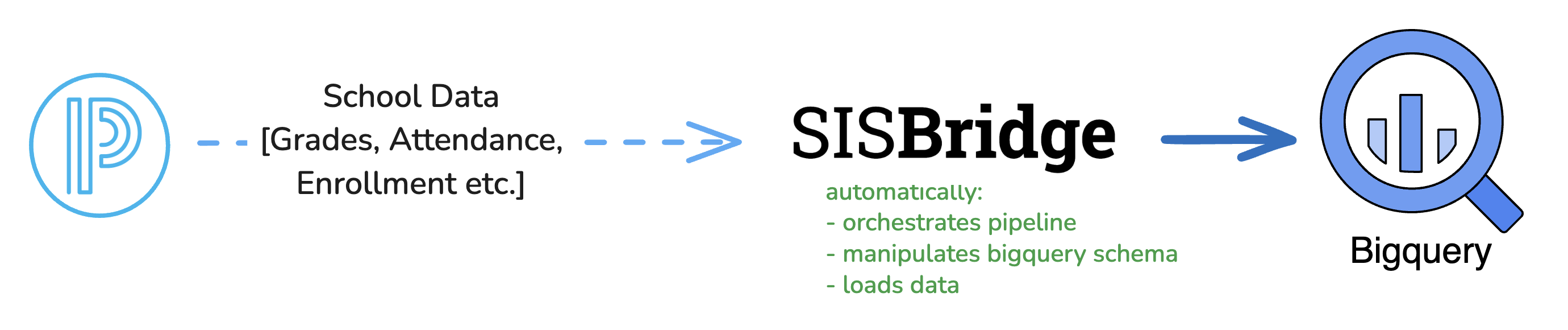
SISBridge data pipeline: PowerSchool DEM β†’ SFTP β†’ SISBridge β†’ BigQuery β†’ Looker

What PowerSchool data can you move to BigQuery?

Any DEM-exportable report can flow into BigQuery. Here's what schools typically sync first.

πŸŽ“

Enrollment & Demographics

Current and historical enrollment by school, grade, and program. Track year-over-year trends and demographic breakdowns in BigQuery.

πŸ“…

Attendance

Daily and period-level attendance, absence reasons, and tardy records. Power real-time intervention dashboards for counselors and administrators.

πŸ“Š

Grades & GPA

Course grades, final marks, GPA calculations, and report card data β€” queryable across cohorts, grade levels, and time periods.

πŸ“š

Course & Schedule Data

Master schedule, course catalogue, class rosters, and teacher assignments. Useful for section analysis and staffing reports.

πŸ“

Standardised Test Scores

State assessments, PSAT/SAT results, and benchmark test data β€” all joinable with enrollment and demographic records in BigQuery.

πŸ‘€

Student & Contact Records

Student profiles, guardian contact information, and custom fields from your PowerSchool instance. Supports communication and outreach analytics.

Any PowerSchool DEM export β€” including custom fields and district-specific reports β€” can be loaded into BigQuery.

Why PowerSchool schools choose SISBridge

Built for districts and independent schools that want analytics without engineering.

No ETL pipelines to build or maintain

No Python scripts, no Airflow DAGs, no cloud functions. You configure a DEM export destination once β€” SISBridge owns everything that happens after the file arrives.

Automatic schema management across PowerSchool updates

When a PowerSchool upgrade changes a column name or adds a new field, SISBridge detects the change and updates your BigQuery table automatically. No weekend incidents, no broken reports.

Fresh data in leadership dashboards every morning

Schedule DEM to export overnight and your principals, superintendents, and department heads start each day with dashboards reflecting yesterday's enrollment, attendance, and performance data.

SOC 2 & ISO 27001 certified infrastructure

Student data is encrypted in transit and at rest. SISBridge runs on Google Cloud and AWS with enterprise-grade certifications β€” aligned with FERPA, state privacy laws, and district data governance requirements.

Works across PowerSchool versions and hosting types

Whether you're on PowerSchool Cloud or on-premise, SISBridge connects the same way β€” via SFTP from DEM. No API tokens, no special connectors, no version-specific configuration.

Dedicated implementation partner included

Every school and district gets a dedicated partner who configures BigQuery, maps your DEM exports, and handles the entire setup. Your IT team never needs to touch infrastructure.

Frequently asked questions

Everything you need to know about connecting PowerSchool to BigQuery.

Stop running PowerSchool exports manually.

Join our free Pilot Partner Program β€” limited spots available. Your dedicated implementation partner handles the entire BigQuery setup.

Loading security verification…
Free during pilot SOC 2 Type II & ISO 27001 certified Dedicated implementation partner

Also supported by SISBridge