πŸš€ Pilot Partner Program Now Open! Join schools getting early access to automated data pipelines. Join now β†’

Canvas LMS Integration

Automate Canvas LMS Exports to BigQuery

SISBridge continuously syncs your Canvas LMS data into Google BigQuery β€” giving your school real-time learning analytics in Looker without manual exports, custom code, or data engineering effort.

Canvas has the data. Getting it out is the hard part.

Instructors and administrators know the insights they want β€” but the path from Canvas to a usable dashboard is still painful.

πŸ”’

Learning data locked inside Canvas

Grades, submissions, engagement, and quiz results live in Canvas but can't be queried across cohorts, combined with SIS data, or tracked over time without exporting everything first.

πŸ› 

Canvas Data 2 requires real engineering

The Canvas Data 2 API gives you the raw access you need β€” but turning it into a working pipeline requires developers, infrastructure, and ongoing maintenance most school IT teams don't have capacity for.

πŸ”—

LMS and SIS data never talk to each other

Canvas learning data and PowerSchool or Veracross enrollment data sit in separate silos. The most useful analytics β€” combining attendance, grades, and course engagement β€” require joining them, which means a data warehouse.

How Canvas connects to BigQuery with SISBridge

Configure your Canvas export destination once. SISBridge handles the rest automatically.

1

Connect Canvas instance to SISBridge

Your SISBridge implementation partner configures your Canvas instance to connect with SISBridge. This is a one-time setup β€” no ongoing involvement from your team required.

One-time setup. Your partner handles all the technical configuration.
2

SISBridge processes and loads every export automatically

With each Canvas export, SISBridge infers data types, resolves any schema changes, and loads structured data into your BigQuery dataset. No manual steps, no code to run.

Fully automated. Schema changes in Canvas exports are handled without intervention.
3

Query Canvas and SIS data together in Looker

Your Canvas learning data is now in BigQuery alongside your SIS data. Join enrollments, attendance, course grades, and submission activity in a single dashboard β€” and finally give teachers and administrators the full picture.

Cross-system analytics. Combine Canvas + SIS data in one query.
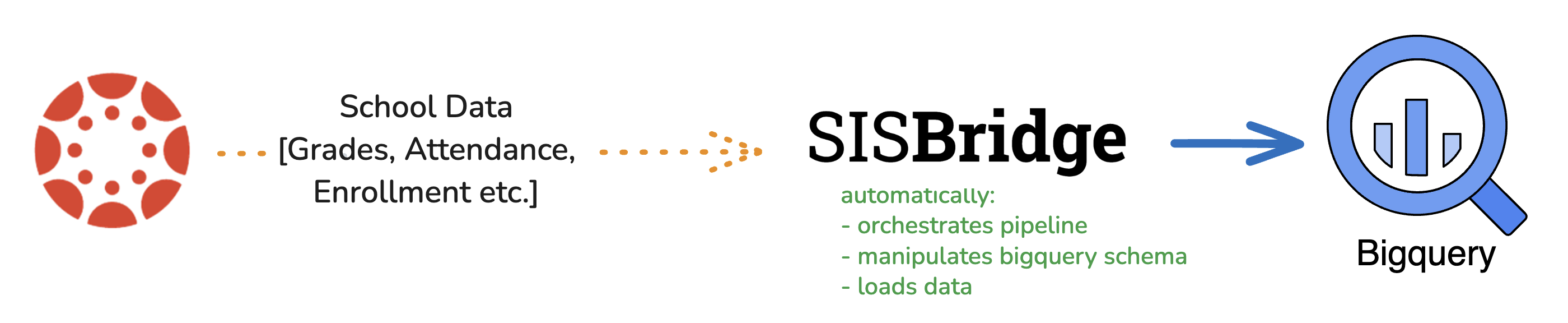
SISBridge data pipeline: Canvas LMS β†’ SFTP β†’ SISBridge β†’ BigQuery β†’ Looker

What Canvas LMS data can you move to BigQuery?

From course structures to individual submission records β€” all of it queryable in BigQuery.

πŸ“š

Courses & Enrollments

Course catalogue, active enrollments, section assignments, and historical course records β€” the backbone of any learning analytics dataset.

πŸ“

Assignments & Submissions

Every assignment across all courses: due dates, submission timestamps, late flags, and completion rates β€” queryable at the student and cohort level.

πŸ“Š

Grades & Outcomes

Final course grades, rubric scores, learning outcome results, and gradebook data β€” joinable with SIS enrollment and demographic records.

πŸ“‹

Quiz & Assessment Results

Canvas quiz attempts, scores, time-on-task, and question-level responses. Useful for identifying concepts where students consistently struggle.

πŸ’¬

Discussion & Engagement

Discussion post counts, page views, and login activity. Track which students are disengaged before performance drops β€” not after.

πŸ‘€

User & Account Data

Student and teacher accounts, course roles, and SIS ID linkages that allow you to join Canvas records with PowerSchool or Veracross data in BigQuery.

Combine Canvas with your SIS in BigQuery

When Canvas LMS and your SIS (Veracross, PowerSchool, or others) both load into BigQuery via SISBridge, you can join them on student IDs to build unified dashboards β€” linking learning activity, grades, attendance, and demographics in a single query.

Why Canvas schools choose SISBridge

Learning analytics shouldn't require a data engineering team.

No Canvas Data 2 engineering required

Canvas Data 2 is powerful but complex to operationalise. SISBridge abstracts all of that β€” your implementation partner sets it up, and the data flows into BigQuery without your IT team writing a line of code.

Unified LMS + SIS analytics in one place

For schools using both Canvas and a SIS like Veracross or PowerSchool, SISBridge loads all of it into the same BigQuery project β€” so you can finally query learning data alongside enrollment, attendance, and demographics.

Automatic schema management

Canvas export structures change with new releases. SISBridge detects those changes and adapts your BigQuery tables automatically β€” no broken pipelines, no manual fixes after an Instructure update.

SOC 2 & ISO 27001 certified infrastructure

Student learning data is sensitive. SISBridge encrypts all data in transit and at rest, runs on certified Google Cloud and AWS infrastructure, and provides complete audit logs for your compliance and privacy teams.

Works with every Canvas instance

Whether you're a K-12 school or a higher education institution using Canvas Cloud or a self-hosted deployment, SISBridge connects with your Canvas instance via API.

Dedicated implementation partner

Every institution gets a dedicated partner who handles Canvas export configuration, BigQuery dataset setup, and the initial data load end-to-end. Your instructors and administrators start seeing dashboards β€” not infrastructure tickets.

Frequently asked questions

Everything you need to know about connecting Canvas LMS to BigQuery.

Ready to unlock your Canvas learning analytics?

Join our free Pilot Partner Program β€” limited spots for Canvas schools. Your dedicated partner handles the full setup.

Loading security verification…
Free during pilot SOC 2 Type II & ISO 27001 certified Dedicated implementation partner

Also supported by SISBridge